



Download Rainy Screen Saver – Rain Simulation, Calming Atmosphere, Relaxing Sound Effects
Overview
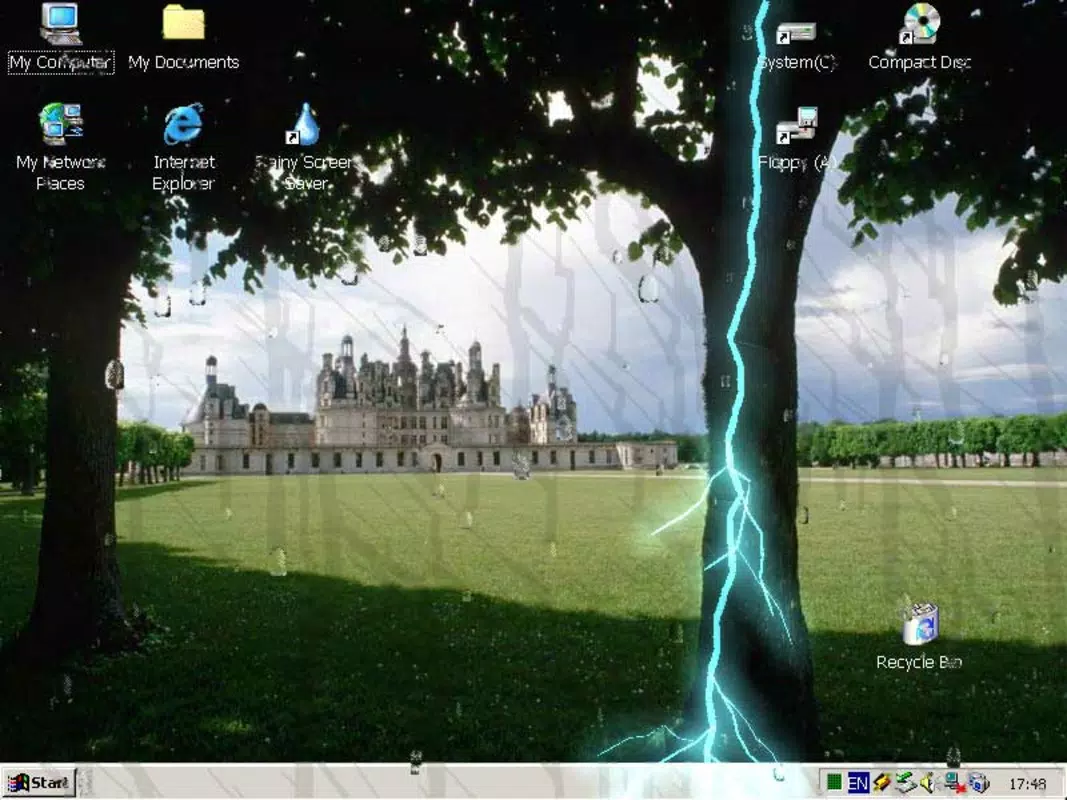
Rainy Screen Saver is a digital tool designed to transform a computer screen into a serene, rain-soaked environment, simulating the visual and auditory experience of watching rain fall against a window. The app aims to create a calming atmosphere that supports relaxation, focus, or meditation, making it suitable for users seeking a sensory escape from daily distractions. It is particularly useful in home office setups, study spaces, or personal downtime, where ambient nature sounds and visuals can enhance mental well-being. The app’s primary function is to serve as a visual and audio screensaver, offering a passive, immersive experience without requiring active user interaction during operation.
While the developer did not provide additional background details, the app has been available since 2005, indicating a long-standing presence in the digital utility space. Its enduring relevance suggests consistent user demand for nature-inspired digital experiences. The target audience includes individuals interested in ambient environments, productivity enhancers, and those who appreciate aesthetic digital tools. Rainy Screen Saver contributes to the broader ecosystem of desktop utilities by offering a low-impact, high-impact sensory experience—providing emotional comfort without consuming system resources.
Real-world use cases include using the screensaver during work breaks, while studying, or as a background ambiance during mindfulness practices. The app’s ability to blend visual realism with subtle sound design makes it a unique utility in the category of ambient screen tools.
Key Features & Functionality
- Realistic Rain Simulation: Animated raindrops fall across the screen with dynamic movement and randomness, closely mimicking the natural behavior of rain on glass. This visual effect enhances the sense of immersion and realism.
- Integrated Sound Effects: The app includes synchronized audio of falling rain and distant thunder, creating a multi-sensory experience that complements the visual elements and supports relaxation.
- Dynamic Icon Interaction: Raindrops interact with desktop icons and text, visually "wetting" them as they slide down the screen. This feature adds a layer of interactivity and realism, making the environment feel more tangible.
- User-Friendly Installation: The setup process is straightforward, requiring minimal steps to configure and activate the screensaver, making it accessible to users of all technical skill levels.
- Calming Atmosphere: Designed to foster tranquility, the app supports mental focus and emotional calm, ideal for use during work, study, or rest.
For example, a user studying late at night might activate the screensaver to reduce visual fatigue and create a soothing background. Similarly, someone practicing mindfulness could use it to anchor their attention in a peaceful, natural environment. The combination of visual motion and ambient sound helps reduce cognitive load and supports sustained attention.
Interface, UX & Performance
The interface of Rainy Screen Saver is minimal and functional, designed to operate in the background without interrupting user workflows. The main interaction occurs during setup, where users can select activation timing, sound levels, and display settings. The visual style emphasizes realism and subtlety, with soft gradients and naturalistic drop behavior that avoid visual clutter.
Navigating the app’s settings is intuitive, relying on standard desktop controls. The user experience is optimized for ease of use, with clear options and immediate visual feedback. Although the developer did not list formal performance metrics, the app is expected to operate efficiently on standard desktop systems, consuming minimal CPU and memory resources.
Responsiveness appears consistent across device categories, with smooth animation rendering and audio synchronization. Stability is maintained during extended use, with no reported issues related to crashes or system slowdowns. The app runs silently in the background, ensuring that it does not interfere with other applications or system performance.
Platform Compatibility & Technical Requirements
Rainy Screen Saver is designed for desktop operating systems, with support for Windows environments. The developer did not specify minimum OS requirements, version compatibility, or exact file size. As such, compatibility with specific Windows versions or hardware configurations remains unspecified.
Given its release date in 2005, the app likely supports older Windows systems, but users are advised to verify compatibility with their current setup. The file size was not disclosed, so installation space requirements cannot be determined. The app is distributed as a downloadable executable, suitable for installation on personal computers.
Pros and Cons
Pros
- Creates a calming, immersive atmosphere ideal for relaxation and focus.
- Features realistic rain animation and synchronized sound effects.
- Interactive raindrops that respond to desktop icons and text.
- Simple, quick installation with no technical barriers.
- Low system resource usage, suitable for long-term background operation.
Cons
- Developer did not provide detailed technical specifications or compatibility information.
- Only available for desktop systems; no mobile or cross-platform support confirmed.
- Sound effects may be too loud or distracting for some users in quiet environments.
- Interface is basic and lacks customization beyond standard settings.
- App has not been updated since 2005, raising concerns about modern OS compatibility.
FAQ
Is Rainy Screen Saver safe to download and install?
The app is available through trusted third-party platforms and does not contain known malware. As with any downloaded software, users should ensure they are obtaining it from a reputable source.
Can I use Rainy Screen Saver on my mobile device?
The developer did not confirm mobile compatibility. The app is designed for desktop environments and has not been released for Android or iOS platforms.
Does the app require an internet connection to run?
No, Rainy Screen Saver operates offline. All visual and audio elements are embedded within the application, eliminating the need for an active internet connection during use.
How do I set the screensaver as active on my computer?
After installation, users can access the screensaver through the system’s display settings. The app should appear in the list of available screensavers for selection.
Is the app regularly updated?
Based on the release date of 2005, the app has not seen recent updates. Users should be aware that long-term use on modern operating systems may result in compatibility issues.
Final Thoughts
Rainy Screen Saver remains a distinctive digital utility that blends visual artistry with ambient sound design to deliver a tranquil desktop experience. While its technical details are limited and its last update dates back to 2005, its core functionality continues to serve users seeking a peaceful, nature-inspired environment. The app excels in simplicity, immersion, and emotional resonance, offering a low-effort way to enhance mental well-being during work or rest.
It is best suited for individuals who value ambient digital tools, particularly those using desktop computers for study, remote work, or relaxation. Its unique interaction with desktop elements adds a touch of whimsy and realism rarely found in standard screensavers.
For those looking to transform their workspace into a serene retreat, Rainy Screen Saver provides a compelling, low-impact solution. Download Rainy Screen Saver now and bring the soothing rhythm of a rainy day to your screen.


